Covering an absent teacher in three clicks
At 7:15 a teacher sends a message: sick today. In most schools what follows is a WhatsApp group, a coordinator walking the corridor, and a lesson that starts late. A daily cover board does the same work in three clicks, tells the substitute on their phone, and keeps the count for the end of the month.
What the board shows
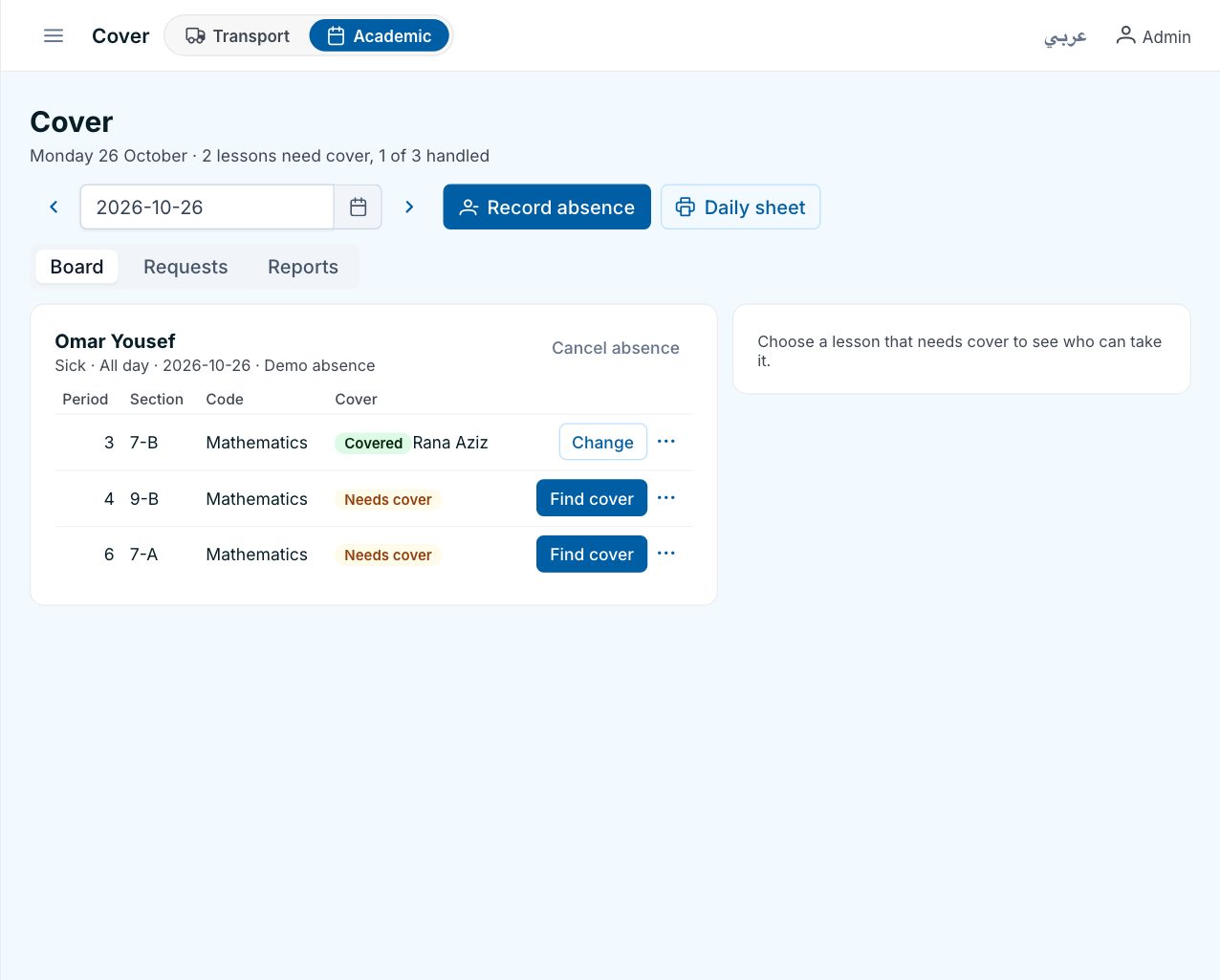
One day at a time: every lesson of every absent teacher, and whether it is still uncovered, assigned, confirmed by the substitute, or declined. Beside it, the absences themselves and any other changes to the day, such as a room change or a cancelled lesson. The coordinator opens it at 7:00 and knows exactly what the morning needs.
Recording the absence
The coordinator records it from the dashboard, for the whole day or for certain periods, as sick leave, leave or training. If the school allows it, a teacher can also send a leave request from the app; when the school approves it, the absence is recorded automatically and the board shows the lessons that need cover. A pending request can be withdrawn by the teacher before anyone decides.
Ranked substitutes, not a list of names
For each uncovered lesson, the board ranks the teachers who are free in that period. Highest come those who teach the same subject, then those who already teach that section, those on the same campus, those who have not reached their daily maximum, and those with the fewest covers this week and this month, so the load is fair. Teachers who cannot take it are listed too, with the reason: teaching at that time, absent themselves, unavailable that period, or it is their own lesson. The coordinator picks one. That is the second click.
The substitute confirms on the phone
The substitute gets a push notification with the section, the subject, the period and the room, and confirms or declines in the app. A decline puts the lesson back on the board and tells the staff who run it. Teachers, students and parents see the cover in their own timetable the same day. That is the third click, and it was not yours.
Other changes to the day
Not every absence needs a substitute. The board also handles a room change, swapping two lessons of a section, cancelling a lesson, and merging two sections for one period. Every change is checked so that it does not double-book a teacher or a room, and the people who are actually teaching those lessons that day, including a substitute, are notified. When a covered lesson is cancelled, the cover is released and the substitute is told.
Month end
The monthly report lists, for each teacher, how many lessons they covered, how many count as extra, and the days they were absent, ready to export to Excel for payroll. A second view shows absences by weekday, so a pattern of Sunday absences is visible without anyone having to notice it.
Questions
Can a teacher cover a subject they do not teach?
Yes, as supervision. The board shows such candidates below the qualified ones and marks the cover accordingly.
What if nobody is free?
The lesson stays on the board as uncovered, so it is never forgotten. The coordinator can merge the section with another, cancel the lesson, or move it, and the change reaches the teachers and parents concerned.
Does a cover count toward the substitute's weekly load?
Covers are counted separately from the timetable, and each one is marked as extra or not, which is what the month-end report uses.
See it on your own lists
A free demo on WhatsApp, in English or Arabic. We set Schooliy up with your school’s own students, buses and classes.