How a school timetable generator works
Every school builds its timetable once a year, usually over a week of evenings with a spreadsheet. A timetable generator does the placing in minutes, but it is only as good as what you give it. Here is what it needs, how it decides, and what to do with the lessons it cannot place.
What the generator needs before it starts
- The school year, its working days, and the bell schedule (periods and breaks) for each campus.
- Sections (7-A, 7-B, and so on) and, for kindergarten or early grades, whether they finish earlier and have one class teacher for most subjects.
- The curriculum: how many periods a week of each subject each grade or section gets, and which of them are double periods.
- Teachers, the subjects each one teaches, their weekly load and daily maximum, and the periods when they are not available.
- Rooms with a type: classroom, lab, computer room, gym, library. Subjects that need a special room say so, and each section can have its own home room for ordinary lessons.
- Teacher allocation: which teacher takes each subject in each section. Schooliy flags overloads and unqualified assignments here, before generation starts.
Most of this can be imported from Excel: subjects, teachers, rooms, the curriculum and class lists, up to 1,000 rows at a time, with a preview that shows every row that would fail and why.
How it places lessons
The generator takes every lesson of the week as a unit (Arabic, 7-A, period 3 of 5) and looks for a slot where the section is free, the teacher is free and available, and a suitable room is free. Hard rules are never broken: no teacher in two places, no section with two lessons at once, no lab double-booked, no lesson outside the section's school day, no double period across a break. Then it improves the result against soft preferences: spreading a subject across the week, avoiding gaps in a teacher's day, keeping a section's days balanced, and respecting a teacher's preferred or avoided periods.
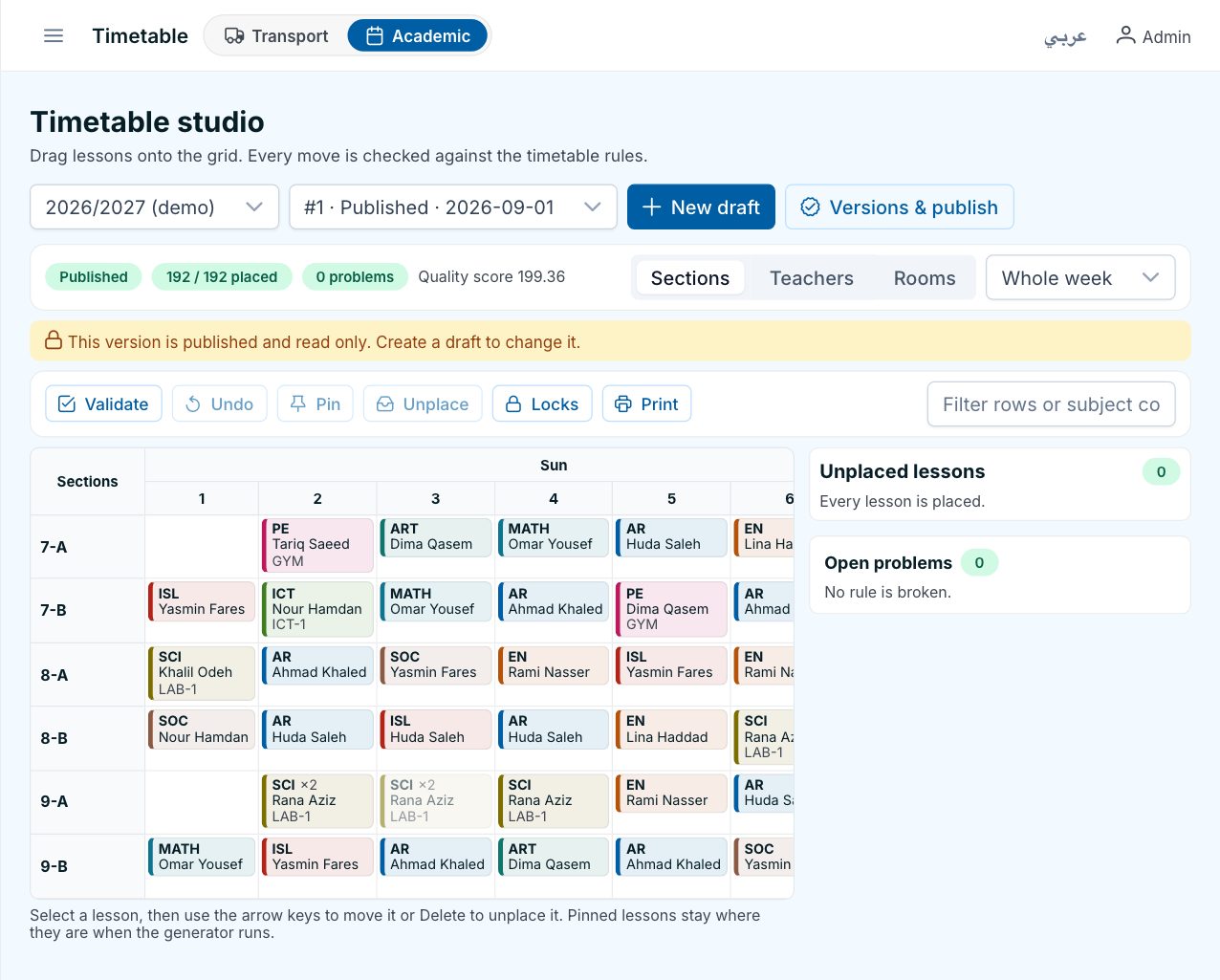
In Schooliy you choose a preset (balanced, compact teacher days, or your own weights), set a time budget, and watch the run place lessons live. You can lock lessons that must not move, and regenerate one grade while keeping the rest exactly as it is.
Why some lessons stay unplaced
A generator that reports 100% placement for every school is hiding something. Real schools have real conflicts, and an honest generator lists them:
- Two subjects need the one lab in the same periods, and there are only so many lab periods in a week.
- A part-time teacher is available for fewer periods than her allocated lessons need.
- A section's day is shorter than its curriculum: 32 periods of lessons in a 30-period week.
- A double period has nowhere to sit without crossing a break.
Schooliy lists each unplaced lesson with the reason, so the fix is a decision, not a search. Usually it means one more lab period, a different teacher for one subject, or one period less of something.
Fixing the rest by hand
Open the timetable studio and drag the lesson where you want it. If it clashes, the move is refused with the reason (teacher busy, room busy, outside the section's day) rather than silently accepted. Lock what matters, then regenerate the rest. When the grid is clean, validate it and publish.
Publishing and changes during the year
A published timetable never changes behind your back. A new version shows exactly what changed from the last one, and only the teachers and parents whose lessons moved are notified. Teachers see today and the week on their phone, parents see their child's section, and daily changes (a cover, a room change, a cancelled lesson) appear the same day.
Questions
How long does generation take?
For a typical school of 20 to 40 sections, a few minutes with the default time budget. The run shows its progress live, and you can stop it early and keep the best result so far.
Can we keep last year's timetable as a starting point?
Yes. A new version can be created from the published one, and locked lessons stay where they are when you regenerate.
Does it handle kindergarten differently?
Yes. A grade can be set to finish earlier, to have no free periods between lessons, and to have one class teacher for most subjects with specialists for the rest.
See it on your own lists
A free demo on WhatsApp, in English or Arabic. We set Schooliy up with your school’s own students, buses and classes.