Stop-by-stop attendance and SOS on the school bus
Most schools can say which students are assigned to a bus. Far fewer can say, for last Tuesday, who actually boarded at which stop and when, and what happened when the bus broke down on the ring road. A paper list on the bus does not answer either question. This is what a digital record looks like, and what it changes.
Why the paper list fails
It is filled in after the fact, often at the school gate. It cannot tell the office anything until the bus is back. It does not know the time, it is lost by Thursday, and nobody can search it in February. When a parent says my child was left at the stop, the paper and the parent disagree and the school has nothing to show.
What the escort records at every stop
In the escort app the day's tour is a list of stops in order. At each one the escort marks every student: boarded, dropped off, or absent. Each mark carries the time and the stop. If a student is absent because the parent reported it in the app, the escort already sees that and the stop may be skipped. If a student's home has moved, the escort can update the location from the field, and the next route uses it.
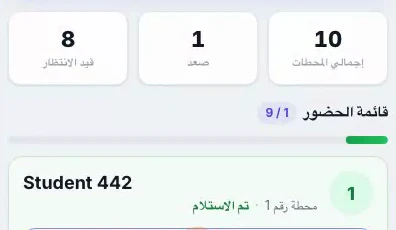
The record is live. The office sees each stop completed as it happens, and parents get a notification the moment their child boards or is dropped off. At the end of the tour the trip is closed with its full list, and that list is what reports are built from.
The SOS button
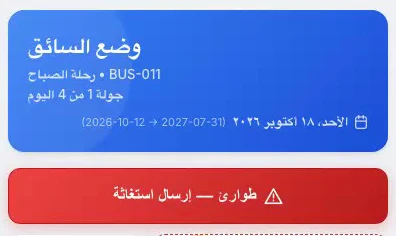
A breakdown, an accident, a child who is unwell, a road closed: the driver or the escort presses one button. The school gets an alert with the bus's live location, who pressed it, and the tour it is on. From the fleet screen the school can call, mark the incident as handled, or dispatch a replacement bus to take over the rest of the tour. The incident stays open until someone closes it, so nothing is handled by assumption.
What parents receive
Each school decides which notifications parents get: the bus is about 500 m away, your child boarded, your child was dropped off, the tour started, the tour ended, an absence was confirmed. One school can switch on all of them and another only the approach alert. The point is that the information goes to the parent before the parent calls the office.
The reports
Trips by day and by bus, attendance outcomes per stop, absences, incidents, and fleet use over any date range, exportable for the school's records. When a question comes, the answer is a filter, not a search through a drawer.
Questions
Can a stop be completed without recording the students?
Each stop is completed with its students' outcomes, so the list cannot be finished by skipping it. If a student is unexpectedly absent, the escort marks exactly that.
What if the school does not use escorts?
The driver app carries the same stop list and the same attendance marks, so a bus with a driver only still produces the record.
What if the SOS was pressed by mistake?
The school marks it handled from the fleet screen, and the incident is closed with that note.
See it on your own lists
A free demo on WhatsApp, in English or Arabic. We set Schooliy up with your school’s own students, buses and classes.